Monday, January 27, 2020

It's the third quarter already???? How did that happen!  From time to time, I will use this blog to share great student work, pictures, updates, announcements and reminders.  Stay tuned for information!


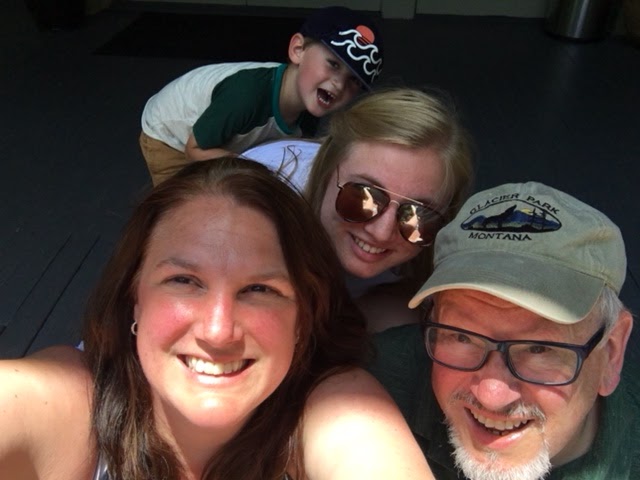
If you did not catch the letter I sent home with your student today, and missed this post from a previous quarter, here is a short introduction of myself: My name is Angela Flickinger-Pierce, and this is my second year of teaching at the Deforest Area Middle School.  I love it here!  I love the students, the other teachers, the community, the parents,  I just love everything about being here!  Before I was a teacher, I worked as a Marketing and Fund Development Director for non-profits in the Madison area.  I realized my true passion was working with children, and I went back to school to become a teacher.  I was certified in 2018, and just completed my Masters of Education this past May.  I live in Poynette with my husband, daughter, son, chihuahuas and chickens. My human family (minus chickens and chihuahuas) can be seen below!


Your student will have Digital Literacy for one quarter. During the quarter we will explore:
-Digital Citizenship, or learning how to be safe online
-Coding, using Tynker and Code.org
-Robotics
-Graphic Design 
-Engineering Design Process 

We will also work on everyday skills such as vocabulary, typing, collaboration, reading comprehension, and becoming learners that problem-solve, think creatively and know how to  independently attack whatever work we are doing. Digital Literacy is a Standards Based class, meaning that the grades earned in this class show what we are able to do according to a standard or skill.  The standards used for grading in this class are the ISTE Standards, or International Society for Technology Education linked here. We will start our quarter by breaking apart these standards, and thinking about what each of these standards means.  Every project completed by your student will include a rubric outlining the ISTE standards that they will be graded on.  You may have questions about these standards-please feel free to ask!  

I will be sending a parent letter home with your students on the first day of class with some other basic information about homework, missing assignments, one-on-one mentoring or tutoring time, and grades.  Additionally, I will be sending home a document with a Digital Literacy Wish List and Volunteer form.  I welcome anyone willing to give their time, from ten minutes to hours!  If you are at all interested in getting involved in the classroom, please fill out the form.  I have linked the form here as well. 

Finally, as we start out this new and fresh school year, I just want to say that your student's hopes, dreams, happiness, comfort and sense of self is my first priority.  If there is anything that you would like me to know about your student, please reach out!  I am here before and after school and can be reached by email and phone. It's going to be a great year!

Tuesday, November 5, 2019

The End of a Quarter...

What???? The first quarter is almost over???  I have been hearing lots of exclamations such as that today, and I have been preparing the students for the last day of our Quarter tomorrow.  We have had a great time exploring technology together, and I am sad to see it end.  

We started out practicing our presentation skills using Google Slides.  We learned about how to do research, and share ideas about a technology that we chose.  The "My Favorite Technology" project showed off our skills, and also shared some fun facts about who we are as people!  It was a great way to get to know each other. 

We then worked on becoming Safe, Responsible and Respectful online citizens with our Digital Citizenship unit.  We used Padlet to create a gallery of interesting facts about being safe online, and reflections on how we think technology has changed our lives.  We also created our own fun comic strip using Make Believe Comics.  Check it out sometime-it is a super fun way to show what we learned!  

After learning so much about being safe online, we launched right into building our Robots! It has been a blast watching the students work to complete the chassis of their robot, and exploring how to engineer an extension for it.    The students were challenged to use the Engineering Design Process to complete an arm for their robot that would move cups into a collection area on our robotics track.  We learned about the Criteria and Constraints, and we put our robots through 3 trials to test out our extensions.  Part of the challenge of the robots is driving, so we did plenty of driving practice too!

To finish off our quarter, I have been introducing the students to Tynker.  Tynker is an online coding program that has games, lessons and seasonal projects that are fun to do as a family!  The link to Tynker is included here, but your student also has access to the Tynker classes I created through their Google Classroom class.  Let me know if you need more suggestions for coding practice and fun-I have lots of ideas!

Finally, throughout the quarter we have been practicing those important fundamental skills such as typing, vocabulary, reading comprehension, and coding.  Your student can continue their hard work in Typing Club, Code.org, Quizlet and Newsela.  If they are looking for something to do, they can always start there!

Please let me know if you have any questions and I hope to see all of your students join me at Robotics club after school.

Tuesday, September 17, 2019

A Wild First Couple of Weeks!

We are just now into our third week of school, and we have already learned so much in 5th grade digital literacy!  

The students have been working in all of our different Beginning Bytes (our warm-ups), and have been learning how to log into different programs using their school Google account.  We have been working in:

-Readworks
-Typing Club
-Code.org
-Quizlet.com

If you happen to have computer access at home, you are welcome to follow the links above, and work with your student on any of these different warm-up activities. This first couple of weeks, we have also been working on using Google Classroom.  Google classroom allows students to see a stream of their assignments when they log into their Chromebooks and get into their classroom. Many of the teachers have been using Google Classroom, and it helps the students stay on top of their work.  If you would like to see more of your students work through Google Classroom, you are welcome to email me and I can walk you through how you enroll as a parent or guardian in the same class as your student. 

This week, we finished our first projects in 5th grade, the "My Favorite Technology" slideshows using Google Slides.  The students shared their slideshows with the students at their table groups, and wrote a reflection on the process.  Many of these slideshows are great, and I have included links to a few of these below. 

Hour 2 Example
Hour 1 Example
Hour 3 Example

Last but not least, this week we will be starting our unit on Digital Citizenship.  It is so important in this digitally driven world to learn about how to be safe, responsible and respectful.  Today, we started by brainstorming the differences between offline and online communities.  I heard many great ideas from your students! This unit will include many great tips to becoming good digital citizens while working with computers and other technology. 

As always, you are welcome to call or email me with any questions you may have! 

Wednesday, August 28, 2019

Welcome to 5th Grade Digital Literacy!

I can hardly believe that the beginning of the 2019-20 school year is just around the corner! I am so

excited to meet all of my new 5th grade students!

A short introduction of myself: My name is Angela Flickinger-Pierce, and this is my second year of teaching at the Deforest Area Middle School.  I love it here!  I love the students, the other teachers, the community, the parents,  I just love everything about being here!  Before I was a teacher, I worked as a Marketing and Fund Development Director for non-profits in the Madison area.  I realized my true passion was working with children, and I went back to school to become a teacher.  I was certified in 2018, and just completed my Masters of Education this past May.  I live in Poynette with my husband, daughter, son, chihuahuas and chickens. My human family (minus chickens and chihuahuas) can be seen below!


Your student will have Digital Literacy for one quarter. During the quarter we will explore:
-Digital Citizenship, or learning how to be safe online
-Coding, using Tynker and Code.org
-Robotics
-Graphic Design 
-Engineering Design Process 

We will also work on everyday skills such as vocabulary, typing, collaboration, reading comprehension, and becoming learners that problem-solve, think creatively and know how to  independently attack whatever work we are doing. Digital Literacy is a Standards Based class, meaning that the grades earned in this class show what we are able to do according to a standard or skill.  The standards used for grading in this class are the ISTE Standards, or International Society for Technology Education linked here. We will start our quarter by breaking apart these standards, and thinking about what each of these standards means.  Every project completed by your student will include a rubric outlining the ISTE standards that they will be graded on.  You may have questions about these standards-please feel free to ask!  
Image result for iste standards


I will be sending a parent letter home with your students on the first day of class with some other basic information about homework, missing assignments, one-on-one mentoring or tutoring time, and grades.  Additionally, I will be sending home a document with a Digital Literacy Wish List and Volunteer form.  I welcome anyone willing to give their time, from ten minutes to hours!  If you are at all interested in getting involved in the classroom, please fill out the form.  I have linked the form here as well. 

Finally, as we start out this new and fresh school year, I just want to say that your student's hopes, dreams, happiness, comfort and sense of self is my first priority.  If there is anything that you would like me to know about your student, please reach out!  I am here before and after school and can be reached by email and phone. It's going to be a great year!

Friday, May 3, 2019

A Robot Chassis is born...to drive!

It has been a great week here in Digital Literacy!  Most of our groups have built the chassis of their robot, and have begun practicing the very tricky racetrack in our room designed by the students themselves.  The color sensors on the robots stop the chassis when they run over the color red-which is why our room is taped up with red duct tape! The students have been very excited to finally drive their creations, and this week was practice week in preparation for their race next week.

Besides all the robotics that we have been doing, we have continued to work on our fundamental skills of vocabulary, typing, and reading comprehension.  This week we worked on an article about scientists who study tornadoes.  Some of the students were wondering how that tied into robots, and we had a great discussion about the purpose of robots, and how scientists might be able to collect data in a safer way during a storm with the help of a robot that could be guided by someone who is farther away from a tornado.  We all agreed that it is best to be FAR away from tornadoes if possible!!!!

If there are any parents that might like to come and help with our robot race, please let me know!  I am sure the students would love to have an audience.  They are very proud of the work that they have been doing. 


Thursday, April 25, 2019

Having fun with Robots!!!!!

It has been a little while since I last posted a blog update.  I apologize for not keeping up to date!  So much is going on here!  With the warmer weather, it seems like we are racing towards the end of the year, and it is hard to keep up!

We have been working on Robots for the past few weeks now. There has been so much excitement with the building and testing of our sensors.  To build our testbed in class, we were assigned our Robotics teams, and we moved to new spots.  Every team was able to pick their own name, and we had some fun ones. The testbed we built helped us learn how to work as a group, and  was good practice working on a team, listening, cooperating, and compromising when it comes to building our robots together.  We also talked about our personal responsibility for making sure we do not lose or damage our robotics parts.  There were some great discussions on ways that we can work together to take care of these great robot kits!  

We have also been discussing the different between an INPUT and an OUTPUT.  Our robots come with a touch sensor and a color sensor.  We tested what each of these sensors did and what information was going into the system, and what was happening next.  As we build our robots, we will be thinking about these INPUTS and OUTPUTS and how they are helping our robots work. 

This week, we started building the chassis to our robot.  The chassis is the base of the robot that has the wheels and supports the same way a car chassis holds up a car.  It has been great seeing how the students are working together and are excited about what they are creating! Below are a few pictures from all of my classes.  Ask your students about their work!  They love to share! 


Wednesday, February 6, 2019

We are coding an Ecosystem? What???

It has been hard to get back into our daily routine with all the snow days, but we are getting there!  There is so much learning that still needs to be done, so it is best if we just get at it!

This week in 5th Grade Digital Literacy, we have continued to work on our coding projects in Tynker. For extra practice, a few classes have worked on debugging existing code in Tynker for the Groggy Groundhog Day project.  Debugging gives the students a valuable experience of looking at existing code and problem-solving to find out what went wrong.  Also, it was fun to see the debugged program predict an early spring!  

We have also started to code our Dino Ecosystem.  This program is tricky, as we are working on parameters that have user input.  This means that if you pick up the finished code, you as the person using the program, will have to put in different numbers for our parameters.  In our Dino Ecosystem, that means that the user gets to pick the number of bushes, the number of t-rex, and the number of triceratops!  

In class, we have also been working on our vocabulary skills.  Many of the words that we are studying, can be helpful in other classes.  Some of the students are struggling with words such as simulation, programming, platform, and modeling.  Quizlet is the fun and interactive way that we work with our vocab, and can be accessed at home or at the public library.  Consider giving your student a chance for some extra vocab practice!  They can race your time on the Match vocabulary game (just ask your student about it...they will tell you all about it, as well as their fastest score!)

In a few weeks, we will be starting on the Robotics unit.  I will be sending out a parent letter by email regarding the framework, and some classroom expectations.  Please watch for that email, and contact me with any questions that you might have!  


Digital Citizenship, Privacy, Websites and More!

Happy Thursday Digital Literacy families!  This week in class, your students are learning about Digital Citizenship, and I wanted to share s...